MowMatter service updates and offers
Optional text messages for existing lawn-care customers. SMS is awaiting activation; saving a preference now does not send a message. This public guide explains the actual account opt-in path.
How to opt in on your phone
- Open your personal customer-account link supplied by your lawn provider or in your invoice email. It opens office.mowmatter.com/customer-account.html with your business and customer account identifiers. The generic URL alone cannot locate your account.
- Sign in using the verified email address on your customer record. If you need your personal link, ask your provider or contact support@mowmatter.com.
- Find Text updates and optional offers. Enter your own US mobile number including +1.
- Choose service updates and/or optional service offers using the separate optional checkboxes. New preferences start unchecked. Neither choice is required to purchase service.
- Read the disclosures, SMS terms and SMS privacy, then tap Save SMS preference. After activation, your first opted-in save requests a confirmation text. If you saved while SMS was off, save again after activation; we do not automatically text historical preferences.
Account opt-in screen
The screenshot below shows the actual authenticated customer-account consent form, captured October 16, 2026. Its consent wording matches the live account form verified October 19, 2026. The phone field is blank; the gray number is a formatting example. Both optional SMS checkboxes are unchecked. This image is evidence of the account form, not a public enrollment form.
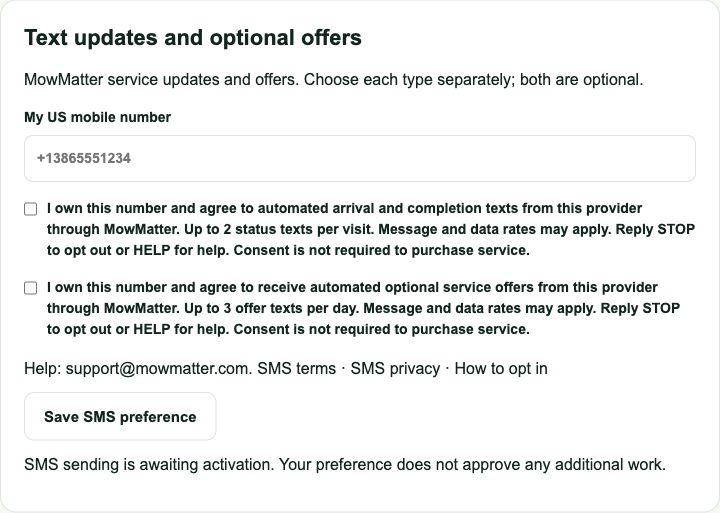
The account form is available only after a customer opens their personal link and signs in. A generic account URL cannot identify a customer. Reviewers can inspect this screenshot and the disclosures below without signing in.
What you agree to
Service updates are automated arrival and completion texts from your provider through MowMatter, up to 2 status texts per visit. Optional offers are automated additional-service offers from your provider through MowMatter, up to 3 offer texts per day, only if separately selected. Message and data rates may apply. Consent is not required to purchase service.
Reply STOP to opt out of all texts from this number; no further messages will be sent after the opt-out confirmation. Reply HELP for help, email support@mowmatter.com, or visit support. START does not restore account consent or approve work; contact support for verified re-enrollment.
Mobile information and text-message opt-in consent are not shared with third parties or affiliates for marketing or promotional purposes. See the SMS privacy policy.
Program confirmation and replies
Opt-in confirmation after activation
MowMatter: You requested texts for your selected preferences. Service updates: up to 2 per visit; optional offers: up to 3 per day, only if selected. Message and data rates may apply. Reply HELP for help or STOP to opt out. Support: support@mowmatter.com.
STOP confirmation
MowMatter: You are unsubscribed from service updates and offers. No further messages will be sent.
HELP reply
MowMatter support: support@mowmatter.com or https://mowmatter.com/contact. Service updates: up to 2 per visit; selected offers: up to 3 per day. Message and data rates may apply. Reply STOP to opt out.
Bird also appends its standard rates and STOP footer to the HELP reply.